Minecraft.io
Minecraft.io




Minecraft.io
Tentang Permainan
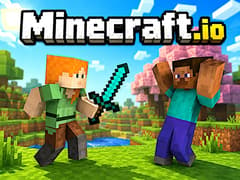
Minecraft.io membawa Minecraft-inspirasi bangunan, kerajinan, bertahan hidup, dan permainan multipemain langsung ke browser Anda. Jelajahi dunia berbasis blok yang besar, kumpulkan sumber daya, bangun basis Anda sendiri, kerajinan peralatan, temui pemain lain, dan bersiaplah untuk makhluk berbahaya saat malam tiba.
Masih banyak yang bisa dilakukan selain hanya menambang dan membangun. Minecraft.io menggabungkan sandbox bertahan hidup dengan fitur multipemain online, dunia yang dibuat pemain, perdagangan, bos, dimensi yang berbeda, dan koleksi besar mini-game. Anda dapat fokus pada menciptakan struktur yang mengesankan, mengumpulkan sumber daya, melawan monster, bersaing melawan pemain lain, atau sekadar menjelajahi dunia bersama teman-teman.
Gameplay Inti Minecraft.io
Dunia Voxel Tanpa Akhir: Jelajahi lanskap berbentuk blok yang besar yang dipenuhi dengan bioma unik, gua dalam, dan harta tersembunyi.
Sistem Kerajinan Mendalam: Campur dan padukan sumber daya untuk membuat segala sesuatu mulai dari pickaxe kayu sederhana hingga armor berlian yang kuat.
Bertahan Hidup Multiplayer: Bergabunglah dengan teman-teman untuk membangun basis besar atau melawan pemain saingan dalam pertempuran waktu nyata.
Dioptimalkan untuk Browser: Nikmati pengalaman sandbox 3D yang mulus di gameVgames tanpa menginstal perangkat lunak berat.
Pilih Cara Anda Ingin Bermain
Minecraft.io menawarkan beberapa cara utama untuk mengalami dunia berbentuk bloknya.
- Mode Kreatif memberi Anda sumber daya tak terbatas dan memungkinkan Anda berkonsentrasi pada pembangunan. Tempatkan blok, muncul mob, bereksperimen dengan ide, dan buat dunia Anda sendiri tanpa khawatir tentang kemajuan bertahan hidup normal.
- Survival PvE fokus pada pengumpulan sumber daya, makanan, kerajinan, peralatan, dan bertahan hidup melawan mob yang bermusuhan.
- Survival PvP menambahkan bahaya lain: pemain lain. Anda perlu bertahan dari lingkungan sambil juga siap untuk membela diri dari lawan.
Bermain Mini-Game Minecraft.io
Jika Anda ingin istirahat dari bertahan hidup dan membangun, ada pilihan mini-game multipemain yang mengejutkan banyaknya.
Anda dapat bersaing dalam SkyWars, melindungi basis Anda di BedWars, mengembangkan pulau terapung di SkyBlock, membangun dari sumber daya yang dihasilkan secara acak di OneBlock, bertahan dari gelombang yang semakin sulit di Zombies, atau bersembunyi dari pemain lain di Hide & Seek.
Kegiatan lain yang tersedia termasuk Duels, DeathMatch, Spleef, tantangan Labirin, dan banyak lagi. Variasi ini berarti Minecraft.io dapat terasa seperti sandbox bertahan hidup dan platform mini-game multipemain.
Bagaimana cara saya bermain Minecraft.io?
Mulailah dengan mengumpulkan sumber daya dasar seperti kayu dan tanah. Buka inventaris Anda untuk membuat meja kerajinan, yang memungkinkan Anda membangun alat yang lebih kuat seperti pickaxe dan pedang. Bangun tempat berlindung yang aman sebelum malam tiba untuk melindungi diri Anda dari mob berbahaya dan pemain saingan.
Bisakah saya bermain dengan teman-teman saya?
Ya! Minecraft.io adalah permainan sandbox multipemain sepenuhnya. Anda dapat membagikan detail server Anda dengan teman-teman, bertemu di dunia yang sama dan membangun struktur epik bersama.
Bagaimana cara saya membuat item baru?
Tekan tombol E untuk membuka inventaris Anda. Jika Anda memiliki bahan mentah yang tepat, Anda dapat membuat item dasar. Untuk resep yang lebih maju, Anda perlu membangun meja kerajinan, menempatkannya di tanah dan berinteraksi dengannya untuk mengakses menu kerajinan penuh.
Lebih Banyak Permainan Terinspirasi Minecraft
Jika Anda menyukai mekanika kerajinan, pembangunan, dan bertahan hidup multipemain dari Minecraft.io, Anda pasti perlu memeriksa permainan blok luar biasa lainnya di gameVgames:
- Bloxd.io Terjun ke salah satu permainan voxel paling populer di web! Nikmati berbagai mode permainan termasuk pembangunan sandbox damai, balapan parkour yang intens, dan arena PvP kompetitif.
- Minefun.io Sebuah alam semesta berbentuk blok yang cepat di mana parkour dan bertahan hidup bertemu. Melompat melalui rintangan yang menantang atau bersantai dalam mode pembangunan santai bersama teman-teman Anda.
- Mineland Sebuah permainan manajemen sumber daya dan eksplorasi yang fantastis. Gali jauh ke dalam bumi, temukan mineral langka dan terus tingkatkan perlengkapan Anda untuk menjadi raja penambangan blok yang ultimate.
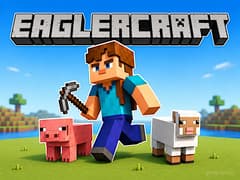
- Eaglercraft Alami petualangan bertahan hidup klasik di browser Anda. Tambang sumber daya, kerajinan perlengkapan epik dan bertahan hidup melawan makhluk berbahaya di dunia blok retro yang sangat akurat ini.
Kontrol
- WASD / Tombol Panah: Bergerak
- Shift Kiri: Berlari
- E / F: Buka atau tutup inventaris tergantung pada versi/mod permainan saat ini
- Tombol Mouse Kiri: Serang / gunakan busur
- Tombol Mouse Kanan: Tempatkan blok / interaksi
- 1-8: Pilih item dari inventaris cepat
- Q: Jatuhkan item aktif
- Enter: Buka obrolan
- Esc: Tutup jendela saat ini / buka menu permainan
Pertanyaan yang Sering Diajukan
Ya. Minecraft.io adalah permainan multipemain online. Anda dapat bertemu pemain lain, berteman, membentuk tim, berdagang, mengunjungi dunia, dan bersaing dalam mini-game multipemain.
Tidak. Minecraft.io adalah permainan browser terpisah yang terinspirasi oleh pembangunan, kerajinan, eksplorasi, dan gameplay bertahan hidup gaya Minecraft. Ini bukan permainan Minecraft resmi dari Mojang Studios.
Ya. Membangun adalah salah satu bagian inti dari permainan. Kumpulkan sumber daya dan gunakan blok untuk membuat rumah, basis, pertanian, mekanisme, atau proyek yang jauh lebih besar.
Permainan ini berbasis browser dan telah terdaftar sebagai mendukung perangkat mobile, meskipun antarmuka dan kontrolnya lebih kompleks daripada di desktop.
Ya. BedWars termasuk di antara mini-game yang tersedia. Lindungi tempat tidur tim Anda sambil mencoba menghancurkan tempat tidur tim lawan.
Ya. SkyWars tersedia sebagai mini-game kompetitif di mana pemain bertarung di pulau terapung yang terpisah.
Ya. SkyBlock memungkinkan Anda memulai di pulau terapung kecil dan secara bertahap mengumpulkan sumber daya dan memperluasnya.
Video Pengenalan Game